• 100% money-back guarantee if files are broken within 3 days• 10% of site payments are donated to UNICEF to support children• When you register, your wallet will be credited with $15• Our small team learns with love and gives back• 100% money-back guarantee if files are broken within 3 days• 10% of site payments are donated to UNICEF to support children• When you register, your wallet will be credited with $20• Our small team learns with love and gives back
• Ready to cooperate with gold, jewelry and silver manufacturers• Send file and resin• The possibility of editing all the models available on the site according to your needs• Designing and manufacturing your desired models in the shortest time, individually and in bulk• Can be made with gold and silver• Ready to cooperate with gold, jewelry and silver manufacturers• Send file and resin• The possibility of editing all the models available on the site according to your needs• Designing and manufacturing your desired models in the shortest time, individually and in bulk• Can be made with gold and silver
Jewelry CAD design is the process of creating precise three-dimensional digital models of jewelry using computer-aided design software. These digital models can be used to develop rings, pendants, earrings, bracelets, and other jewelry before moving into processes such as rendering, 3D printing, casting, stone setting, and final production.
What Is Jewelry CAD Design?
Jewelry CAD design is the process of using specialized computer software to create accurate three-dimensional models of jewelry.
CAD stands for Computer-Aided Design. In the jewelry industry, CAD technology allows designers to develop digital models of rings, pendants, earrings, bracelets, necklaces, and other pieces before physical manufacturing begins.
A jewelry CAD model can serve several purposes. It can help visualize a design, communicate an idea to a client, create a prototype, prepare a model for 3D printing, or support the production of a physical piece through manufacturing processes such as casting.
However, professional jewelry CAD design is not simply about making an attractive 3D shape.
A successful jewelry model must also consider:
Dimensions
Proportions
Structural strength
Material thickness
Ring size
Stone placement
Manufacturing limitations
Casting requirements
Surface finishing
Production workflow
This combination of creativity and technical knowledge is what makes jewelry CAD an important part of modern jewelry development.
The designer then transforms the concept into a three-dimensional digital model.
A typical workflow may look like this:
Idea
↓
Sketch or Reference
↓
3D CAD Modeling
↓
Technical Review
↓
Rendering or Visualization
↓
Model Preparation
↓
3D Printing or Prototype
↓
Casting and Manufacturing
↓
Stone Setting and Finishing
The exact workflow can vary depending on the design and manufacturing method.
Modern jewelry CAD software can support precise modeling and export geometry suitable for digital manufacturing, including the preparation of STL files for 3D printing.
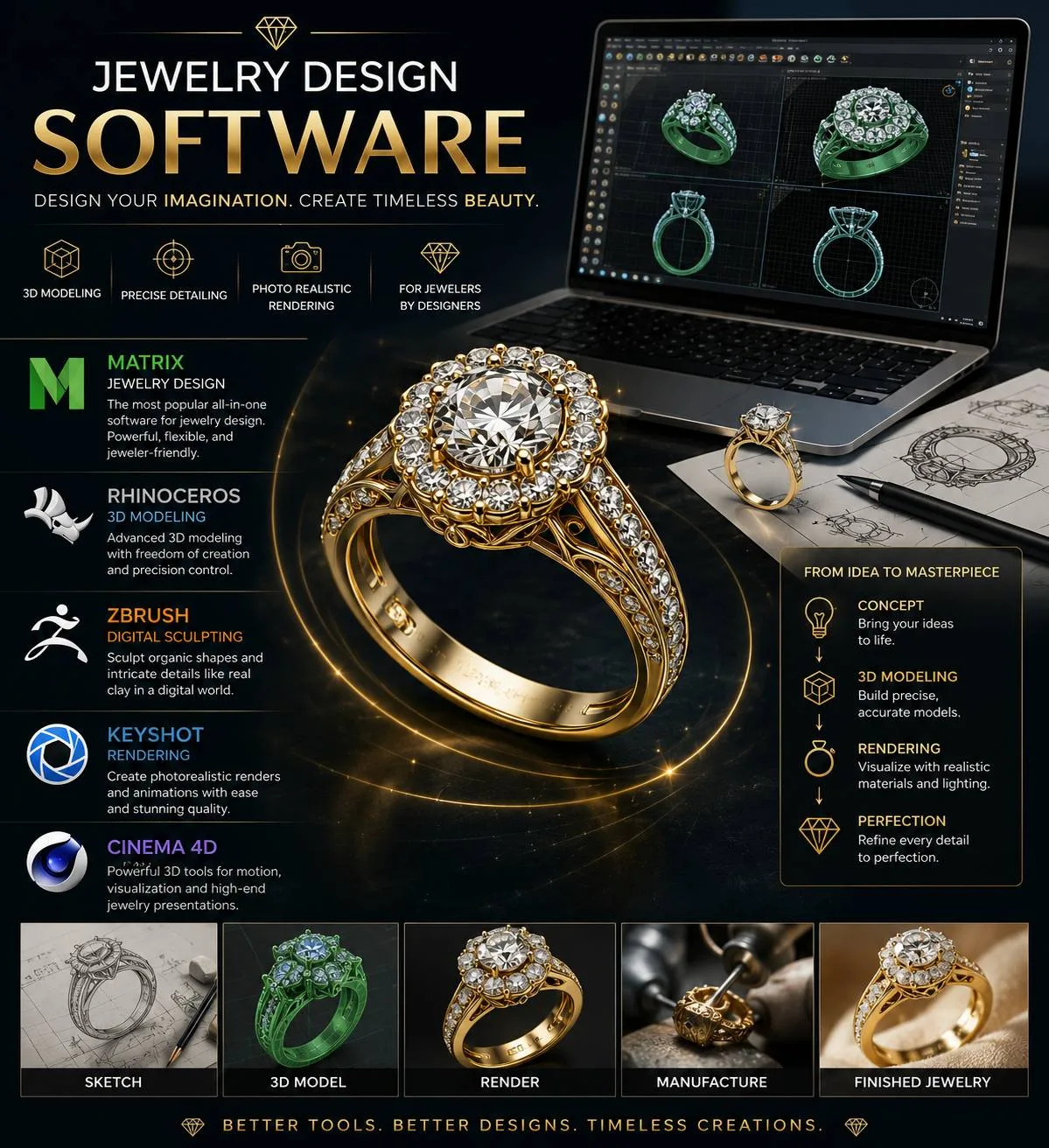
Rhino is widely used for precise 3D modeling and supports jewelry-specific workflows through plugins and specialized tools. Its modeling capabilities can be used for visualization, manufacturing preparation, and STL export for digital fabrication.
MatrixGold is designed around jewelry-specific CAD workflows and tools, making certain jewelry operations faster and more accessible for professional users.
ZBrush is often associated with highly organic and sculptural modeling.
It can be particularly useful for designs involving:
Organic surfaces
Sculptural forms
Decorative details
Character-based elements
Complex textures
Parametric and Jewelry-Specific Tools
Other specialized tools can help designers work with:
Gemstone settings
Ring shanks
Pavé structures
Parametric modifications
Manufacturing analysis
The best software depends on the designer’s workflow, design style, technical requirements, and manufacturing goals.
The Jewelry CAD Workflow
A professional workflow should not stop after creating an attractive 3D model.
Step 1: Concept Development
The process starts with a creative idea.
Important questions include:
Who is the target customer?
What type of jewelry is being developed?
Which materials may be used?
Will gemstones be included?
Is the design intended for mass production or customization?
Step 2: 3D Modeling
The concept is transformed into digital geometry.
The designer develops:
Curves
Surfaces
Solids
Settings
Decorative elements
Structural components
Step 3: Technical Review
This is one of the most important stages.
The model should be checked for potential issues involving:
Very thin areas
Weak structures
Unnecessary weight
Difficult-to-polish areas
Problematic stone settings
Production limitations
Manufacturing awareness should be part of the design process from the earliest stages rather than being considered only after the model is finished.
Step 4: Rendering and Visualization
A digital render can help present the design before physical production.
Rendering may be used for:
Client presentations
Product development
Marketing concepts
Design approval
A render, however, should not be confused with a manufacturing-ready model.
A design can look beautiful in a rendering and still contain technical problems that make physical production difficult.
Step 5: Preparing the Model for Production
The model may then need to be prepared for a specific manufacturing workflow.
Depending on the project, this can include:
Exporting the required file format
Checking the geometry
Repairing model errors
Evaluating thickness
Reviewing structural areas
Preparing for 3D printing
A model that appears correct visually may still require technical preparation before printing or casting.
From CAD Model to Physical Jewelry
A simplified digital manufacturing workflow may look like this:
CAD Model
↓
Technical Review
↓
STL or Production File
↓
3D Printing
↓
Castable Pattern
↓
Investment and Casting
↓
Metal Piece
↓
Finishing
↓
Stone Setting
↓
Final Jewelry
The exact production process depends on the workshop, material, technology, and type of jewelry being manufactured.
What Makes a Good Jewelry CAD Model?
A professional jewelry CAD model should balance three major factors:
1. Design
The model should have:
A clear concept
Good proportions
Visual balance
A recognizable design language
2. Technical Quality
The geometry should be appropriate for its intended use.
Potential requirements may include:
Clean geometry
Suitable thickness
Appropriate structural connections
Correct scale
Properly positioned stones and settings
3. Manufacturability
A professional model should consider the intended production process.
This is the difference between:
A beautiful 3D image
and
A properly engineered jewelry model
Jewelry CAD education and manufacturing-focused workflows emphasize that dimensions, proportions, manufacturing constraints, and production methods are central parts of professional digital jewelry development.
Is Every 3D Jewelry Model Ready for Production?
No.
This is one of the most important things to understand about jewelry CAD.
Not every visually attractive model is ready for manufacturing.
A model may contain:
Extremely thin walls
Weak connections
Open geometry
Incorrect dimensions
Difficult polishing areas
Unstable stone settings
Manufacturing bottlenecks
Before production, the model should be evaluated according to the actual manufacturing method.
Common Jewelry CAD Mistakes
Designing Without Manufacturing Knowledge
A designer may create a visually interesting model without considering how it will be manufactured.
Extremely Thin Details
Small decorative elements may not survive printing, casting, polishing, or normal use.
Incorrect Stone Settings
A gemstone may appear correctly positioned visually while lacking a practical setting structure.
Excessive Weight
Poor geometry can result in unnecessary material usage.
Difficult-to-Finish Areas
Complex structures may create locations that are difficult to polish or finish.
Ignoring the Entire Production Workflow
CAD should not be treated as an isolated stage.
The designer should understand what happens after the digital model is completed.
Who Uses Jewelry CAD?
Jewelry CAD is used by:
Jewelry designers
CAD specialists
Jewelry brands
Manufacturers
Custom jewelry studios
Casting companies
3D printing services
Product developers
Professional CAD/CAM programs also identify roles such as jewelry CAD technicians and product developers as career paths connected to digital jewelry workflows.
Can Beginners Learn Jewelry CAD?
Yes.
However, learning jewelry CAD requires more than simply learning software commands.
A strong learning path should include:
Basic jewelry design principles 3D modeling fundamentals Jewelry-specific CAD techniques Manufacturing knowledge 3D printing basics Casting fundamentals Stone-setting principles
The goal should not simply be:
“I know how to use software.”
The better goal is:
“I can create jewelry models that are visually effective and technically appropriate for their intended purpose.”
Professional Insight from MisterJewel
In professional jewelry CAD, creating the 3D model is only one part of the process.
A successful jewelry design must connect creativity, technical modeling, manufacturing knowledge, and real-world production requirements.
The most important question is not simply whether a model looks beautiful on a screen.
The more important question is whether the design can successfully move from a digital environment into a real manufacturing workflow.
Conclusion
Jewelry CAD design has become an important part of modern jewelry development.
It allows designers to transform ideas into detailed three-dimensional models, explore design variations, communicate concepts, create prototypes, and prepare digital files for manufacturing workflows.
However, professional jewelry CAD requires more than artistic modeling skills.
The best jewelry CAD designers understand the relationship between:
Design
Geometry
Materials
Manufacturing
3D printing
Casting
Stone setting
Final production
A successful CAD model should therefore be both visually compelling and technically intelligent.
FAQ
What does CAD mean in jewelry design?
CAD stands for Computer-Aided Design. In jewelry design, it refers to using computer software to create accurate three-dimensional digital models of jewelry.
What is a jewelry CAD model?
A jewelry CAD model is a digital three-dimensional representation of a jewelry design. Depending on the workflow and file format, it can be used for visualization, design development, 3D printing, prototyping, and manufacturing preparation.
Can jewelry CAD models be 3D printed?
Many jewelry CAD models can be prepared for 3D printing. However, the model should be checked for the requirements of the specific printer, material, and intended manufacturing process before printing.
Is a beautiful 3D jewelry model automatically ready for production?
No. A visually attractive model may still contain technical problems involving thickness, geometry, structural strength, stone settings, or other manufacturing requirements.
What software do jewelry designers use?
Jewelry designers use different software depending on their workflow. Common tools include Rhino, MatrixGold, ZBrush, and other jewelry-specific CAD applications.
Is Rhino good for jewelry design?
Rhino is widely used for jewelry design because of its precise 3D modeling capabilities and its ecosystem of jewelry-focused plugins and workflows.
Can I learn jewelry CAD as a beginner?
Yes. Beginners can learn jewelry CAD by starting with basic modeling principles and gradually developing jewelry-specific design and manufacturing knowledge.
What file format is commonly used for jewelry 3D printing?
STL is one of the commonly used formats in 3D printing workflows, although the appropriate file format depends on the software, printer, and production process.
At MisterJewel.com, we use cookies to enhance your browsing experience and provide you with personalized services. Cookies are small text files stored on your device that help us improve website functionality, analyze traffic, and tailor content to your preferences.
By continuing to use our site, you consent to the use of cookies in accordance with our Cookie Policy. You can manage or disable cookies through your browser settings at any time. However, please note that some features of the website may not function properly without cookies.